


How to Enable Notifications


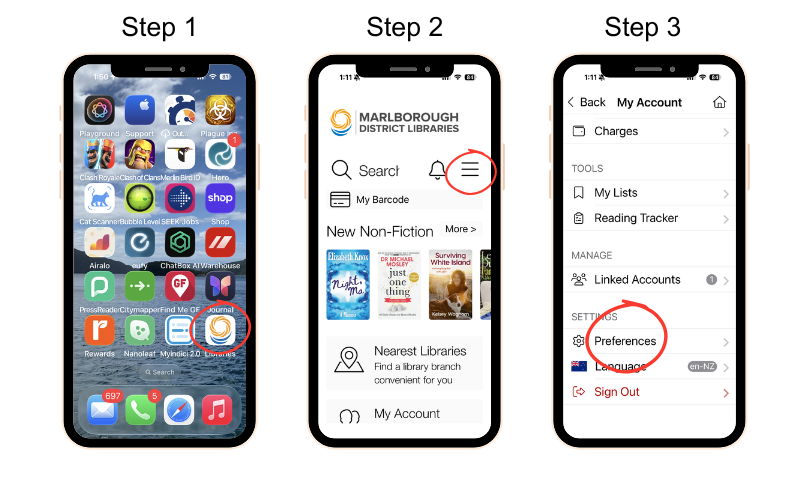
Step 1: Open your library app.
Step 2: Tap the menu at the top right of the screen.
Step 3: Scroll down to Settings and choose Preferences.
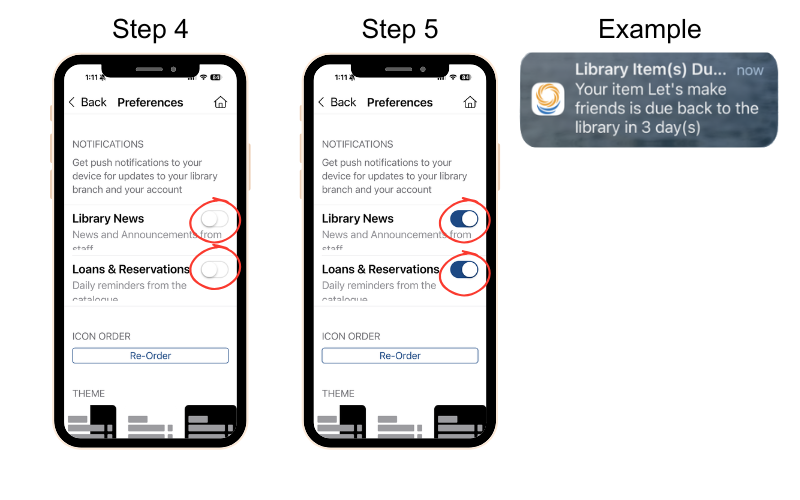
Step 4: Toggle switches next to Library News and Loans & Reservations. Allow notifications when prompted.
Step 5: When the switches are blue, this means you have enabled your library notifications.
You will be notified when;
- Your books are due back
- Your books are overdue
- Your holds are available for collection
- Your account details need updating
Example: This shows an example of a notice that you will receive. This one is notifying you that your books are due back in 3 days.